In this exercise, I focused on only one Azure resource: Azure Storage Tables. My goal was simple: run Table Storage locally with the emulator,
connect a console client project to it through .NET Aspire, and validate that the client can create a table and read/write an entity end-to-end.
How it looks like
This is the ASPIRE project
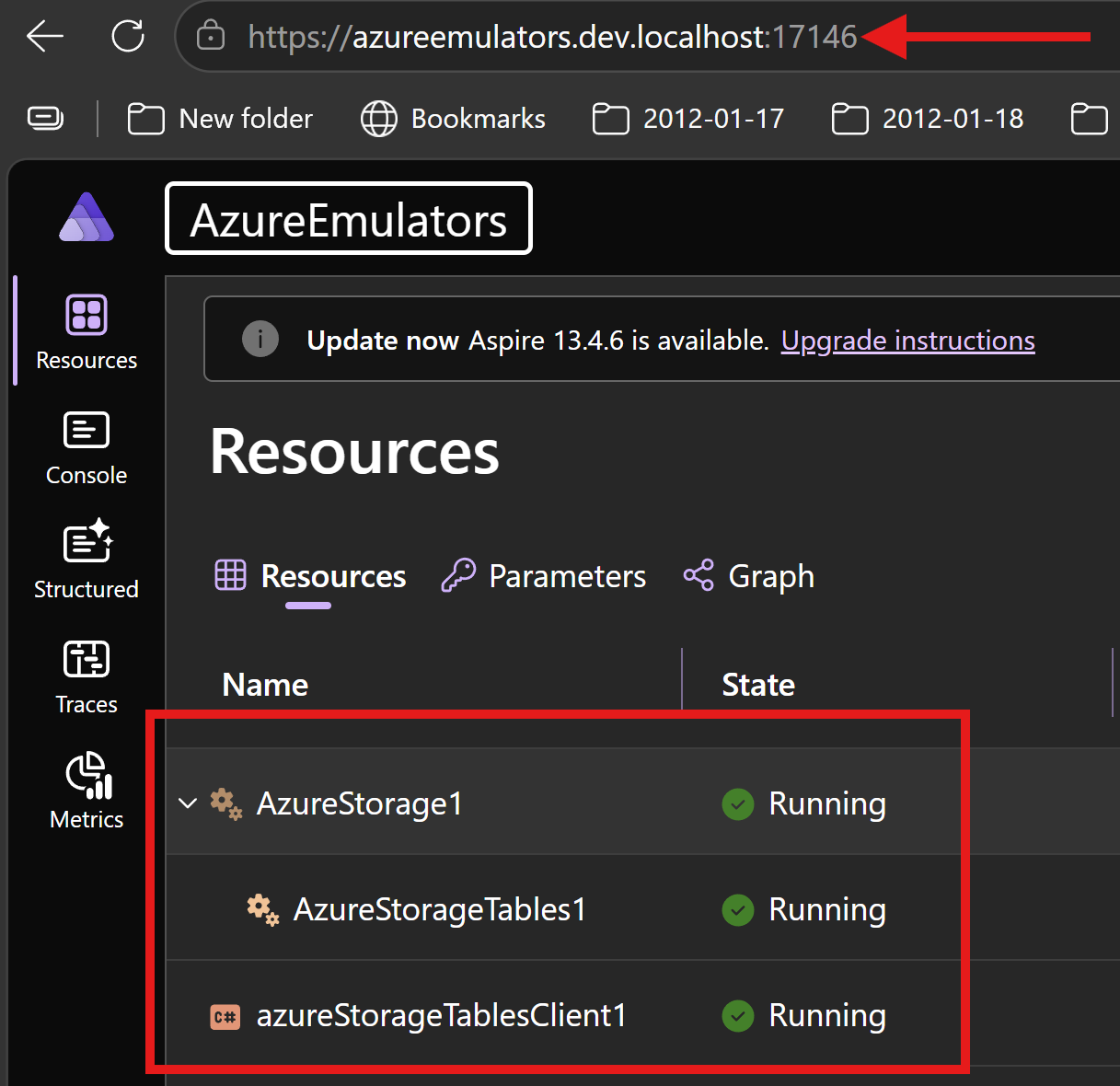
How I wired Azure Storage Tables in Aspire AppHost
In AzureEmulators/AppHost.cs, I added Azure Storage as an emulator and then enabled the Tables endpoint.
Then I connected the client project with WithReference(azureStorageTables) and WaitFor(azureStorageTables).
- Azure Storage emulator resource:
AzureStorage1 - Tables resource:
AzureStorageTables1 - Client project reference:
azureStorageTablesClient1
var azureStorageTables = builder.AddAzureStorage("AzureStorage1")
          .RunAsEmulator()
         .AddTables("AzureStorageTables1")
         ;
var azureStorageTablesProj = builder
    .AddProject<Projects.AzureStorageTables>("azureStorageTablesClient1")
    .WithReference(azureStorageTables)
    .WaitFor(azureStorageTables)
    ;
What my AzureStorageTables project does
In AzureStorageTables/Program.cs, I implemented a startup flow to validate Table Storage connectivity and basic CRUD behavior.
- I scan environment variables and pick
AzureStorageTables1_CONNECTIONSTRING. - I configure
TableClientOptionswith a custom pipeline policy that removes theAuthorizationheader. - I create a
TableServiceClientand get a table client forAndreiTable. - I call
CreateIfNotExistsAsync()to ensure the table exists. - I upsert one entity with PartitionKey
AndreiPartitionand RowKeyAndreiRow. - I read the entity back and print its fields to verify persistence.
Code from my console client project
using Azure.Core;
using Azure.Core.Pipeline;
using Azure.Data.Tables;
using System.Collections;
using System.Collections.Concurrent;

Console.WriteLine("Hello, AzureStorageClient!");
string connectionStringAzurewStorage = "";
foreach (var item in Environment.GetEnvironmentVariables().Cast<DictionaryEntry>())
{
    if (item.Key?.ToString()?.Contains("AzureStorageTables1_CONNECTIONSTRING",StringComparison.InvariantCultureIgnoreCase) == true)
    {
        Console.WriteLine($"{item.Key}: {item.Value}");
        connectionStringAzurewStorage = item.Value?.ToString() ?? string.Empty;
    }
}

TableClientOptions tce = new ();
tce.AddPolicy(new RemoveAuthorizationHeaderPolicy(), HttpPipelinePosition.PerCall);
TableServiceClient client = new(connectionStringAzurewStorage, tce);
var tableClient = client.GetTableClient("AndreiTable");
await tableClient.CreateIfNotExistsAsync();
var entity = new TableEntity("AndreiPartition", "AndreiRow")
{
    {"FirstName", "Andrei" },
};
await tableClient.UpsertEntityAsync(entity);
var resp = await tableClient.GetEntityAsync<TableEntity>("AndreiPartition", "AndreiRow");
Console.WriteLine($"Retrieved entity: PartitionKey={resp.Value.PartitionKey}, RowKey={resp.Value.RowKey}, FirstName={resp.Value.GetString("FirstName")}");
internal sealed class RemoveAuthorizationHeaderPolicy : HttpPipelinePolicy
{
    public override void Process(HttpMessage message, ReadOnlyMemory<HttpPipelinePolicy> pipeline)
    {
        message.Request.Headers.Remove("Authorization");
        ProcessNext(message, pipeline);
    }

    public override ValueTask ProcessAsync(HttpMessage message, ReadOnlyMemory<HttpPipelinePolicy> pipeline)
    {
        message.Request.Headers.Remove("Authorization");
        return ProcessNextAsync(message, pipeline);
    }
}
Output logs from my client project
Waiting for resource 'AzureStorage1' to enter the 'Running' state.
Waiting for resource 'AzureStorageTables1' to enter the 'Running' state.
Waiting for resource ready to execute for 'AzureStorageTables1'.
Waiting for resource 'AzureStorage1' to become healthy.
Finished waiting for resource 'AzureStorageTables1'.
Waiting for resource ready to execute for 'AzureStorage1'.
Finished waiting for resource 'AzureStorage1'.
[sys] Starting process...: Cmd = C:\Program Files\dotnet\dotnet.exe, Args = ["watch", "--non-interactive", "--no-hot-reload", "--project", "D:\\eu\\GitHub\\aspireExtensions\\src\\samples\\13.4\\AzureEmulators\\AzureStorageTables\\AzureStorageTables.csproj", "--configuration", "Debug", "--no-launch-profile"]
 dotnet watch ⌚ Waiting for changes
Hello, AzureStorageClient!
AZURESTORAGETABLES1_CONNECTIONSTRING: DefaultEndpointsProtocol=http;AccountName=devstoreaccount1;AccountKey=Eby8vdM02xNOcqFlqUwJPLlmEtlCDXJ1OUzFT50uSRZ6IFsuFq2UVErCz4I6tq/K1SZFPTOtr/KBHBeksoGMGw==;TableEndpoint=http://127.0.0.1:64407/devstoreaccount1;
Retrieved entity: PartitionKey=AndreiPartition, RowKey=AndreiRow, FirstName=Andrei
 dotnet watch ⌚ Exited
 dotnet watch ⏳ Waiting for a file to change before restarting ...
What is achieved
- I can run Azure Storage Tables locally without provisioning a cloud storage account.
- I get dependency wiring from Aspire between AppHost and AzureStorageTables client.
- I proved table lifecycle and data operations by creating a table, upserting an entity, and reading it back.
- I added a custom HTTP pipeline policy for emulator compatibility.