In this exercise, I focused on only one Azure resource: Azure SQL Database. My goal was simple: run Azure SQL locally,
connect a console client project to it through .NET Aspire, and validate that the client can open a database connection end-to-end.
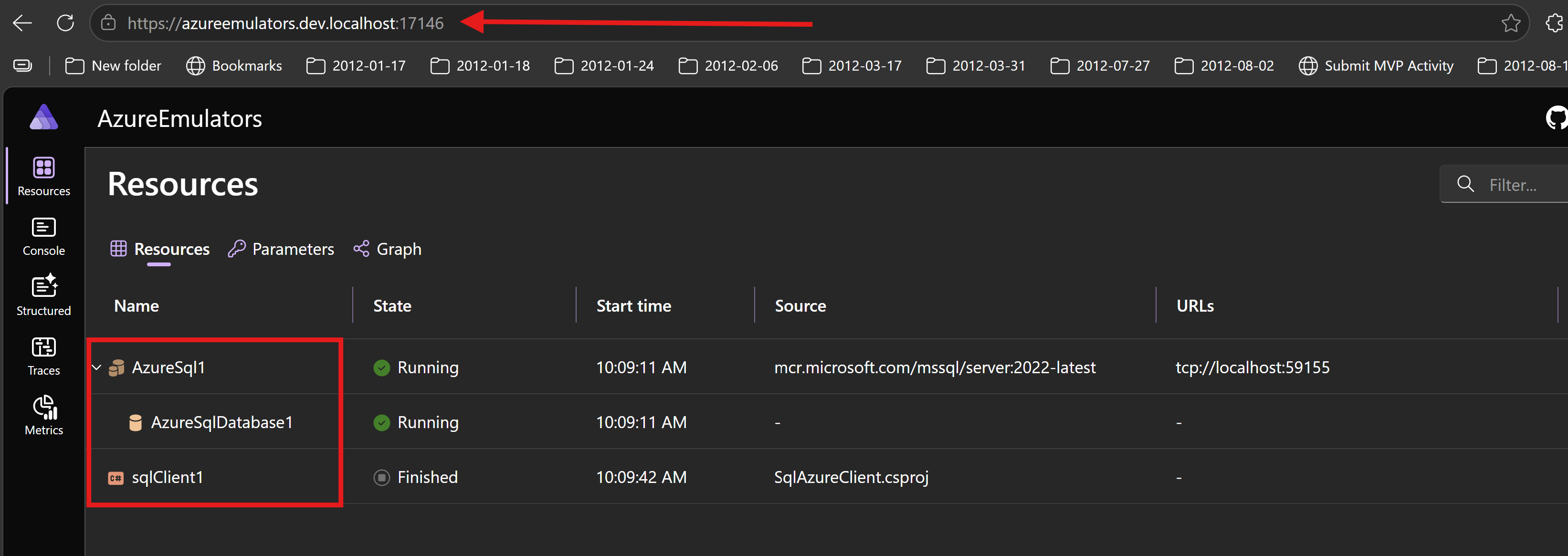
How it looks like
This is the ASPIRE project
How I wired Azure SQL in Aspire AppHost
In AzureEmulators/AppHost.cs, I added Azure SQL Server as a container and then defined one database.
Then I connected the SQL client project to that database with WithReference(db) and WaitFor(db).
- SQL Server resource:
AzureSql1 - Database:
AzureSqlDatabase1 - Client project reference:
sqlClient1
var sqlAzure = builder.AddAzureSqlServer("AzureSql1")
           .RunAsContainer()
        ;

var db = sqlAzure.AddDatabase("AzureSqlDatabase1");

var sqlProj = builder
    .AddProject<Projects.SqlAzureClient>("sqlClient1")
    .WithReference(db)
    .WaitFor(db)
    ;
What my SqlAzureClient project does
In SqlAzureClient/Program.cs, I implemented a simple startup flow to validate SQL connectivity.
- I scan environment variables and pick the Azure SQL connection string.
- I fail fast if the connection string is missing.
- I create a
SqlConnectionusing that connection string. - I call
OpenAsync()to confirm I can connect to the database.
Code from my console client project
using Microsoft.Data.SqlClient;
using System.Collections;

Console.WriteLine("Hello, Azure Sql Client!");
string connectionStringSqlAzure = "";
foreach (var item in Environment.GetEnvironmentVariables().Cast<DictionaryEntry>())
{
    if (item.Key?.ToString()?.Contains("AzureSql") == true)
    {
        Console.WriteLine($"{item.Key}: {item.Value}");
        connectionStringSqlAzure = item.Value?.ToString() ?? string.Empty;
    }
}
if (string.IsNullOrWhiteSpace(connectionStringSqlAzure))
{
    Console.WriteLine("Azure SQL connection string is not set in environment variables.");
    return;
}
Console.WriteLine($"Connection string for Azure SQL: {connectionStringSqlAzure}");
await using var connection = new SqlConnection(connectionStringSqlAzure);
await connection.OpenAsync();
Console.WriteLine($"Success opening the database");
Output logs from my client project
Waiting for resource 'AzureSql1' to enter the 'Running' state.
Waiting for resource 'AzureSqlDatabase1' to enter the 'Running' state.
Waiting for resource 'AzureSql1' to become healthy.
Waiting for resource 'AzureSqlDatabase1' to become healthy.
Waiting for resource ready to execute for 'AzureSql1'.
Finished waiting for resource 'AzureSql1'.
Waiting for resource ready to execute for 'AzureSqlDatabase1'.
Finished waiting for resource 'AzureSqlDatabase1'.
Hello, Azure Sql Client!
ConnectionStrings__AzureSqlDatabase1: Server=127.0.0.1,59155;User ID=sa;Password=ht(mrBm}hTGQ3T9p_D26Ba;TrustServerCertificate=true;Database=AzureSqlDatabase1
Connection string for Azure SQL: Server=127.0.0.1,59155;User ID=sa;Password=ht(mrBm}hTGQ3T9p_D26Ba;TrustServerCertificate=true;Database=AzureSqlDatabase1
Success opening the database
What is achieved
- I can run Azure SQL on my local PC without provisioning a cloud SQL resource.
- I get dependency wiring from Aspire between AppHost and SqlAzureClient.
- I proved connectivity by opening the SQL connection successfully from the client project.
- I now have a repeatable local loop for Azure SQL integration testing.