In this exercise, I focused on only one Azure resource: Foundry with Local AI Models. My goal was simple: run a local AI model (Phi-3.5Mini) using Foundry,
connect a console client project to it through .NET Aspire, and validate that the client can send a chat prompt and stream back AI responses end-to-end.
How it looks like
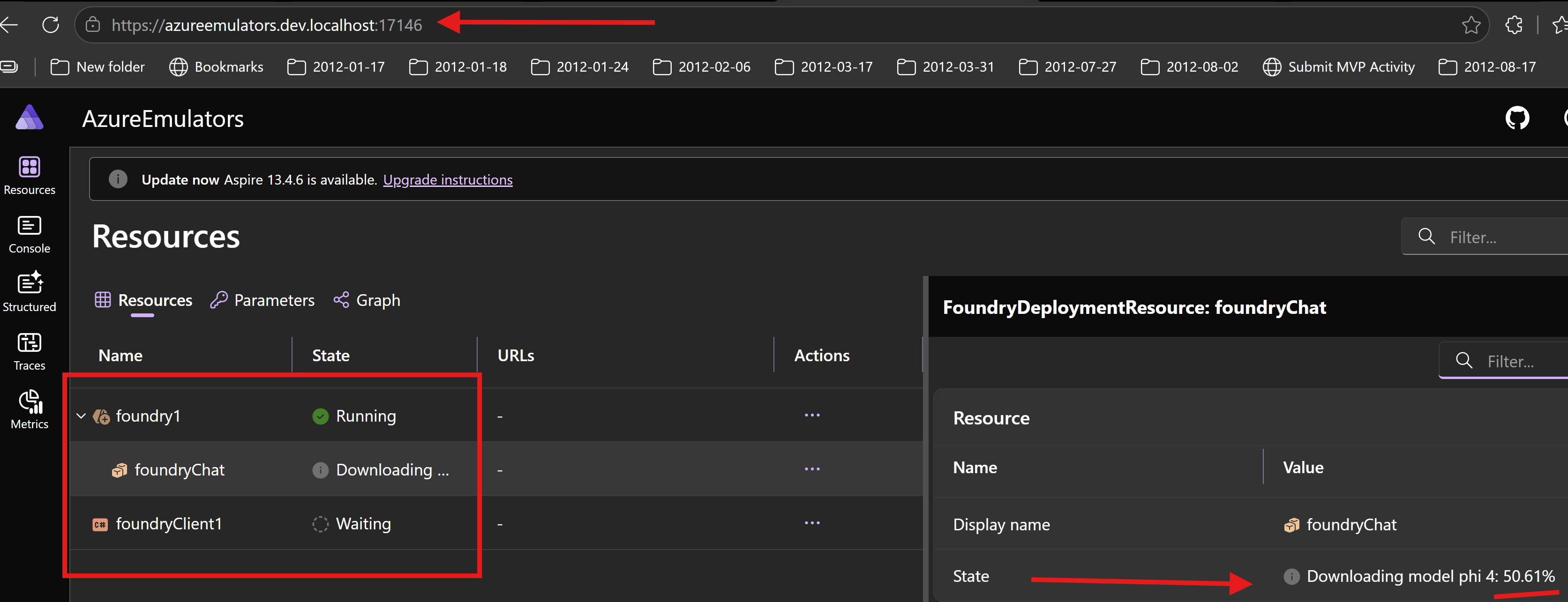
This is the Foundry local deployment view
How I wired Foundry in Aspire AppHost
In AzureEmulators/AppHost.cs, I added Foundry to run locally and deployed the Phi-3.5Mini AI model.
Then I connected the Foundry client project with WithReference(chat) and WaitFor(chat).
- Foundry resource:
foundry1 - Local execution:
RunAsFoundryLocal() - AI Model deployment:
Phi35Minimodel asfoundryChat - Client project reference:
foundryClient1
var foundry = builder.AddFoundry("foundry1")
    .RunAsFoundryLocal();

var chat = foundry.AddDeployment("foundryChat", Aspire.Hosting.Foundry.FoundryModel.Local.Phi35Mini );

builder.AddProject<Projects.FoundryClient>("foundryClient1")
    .WithReference(chat)
    .WaitFor(chat);
What my FoundryClient project does
In FoundryClient/Program.cs, I implemented a startup flow to validate Foundry AI connectivity and demonstrate chat streaming.
- I scan environment variables for Foundry connection details (endpoint, API key, model name).
- I fail fast if any required environment variable is missing.
- I create an
OpenAIClientconfigured with the Foundry endpoint and credentials. - I get a
ChatClientfor the specific model (Phi-3.5Mini). - I send a chat prompt: “Hello! What do you know about Andrei Ignat?”
- I stream and print the AI model’s response in real-time.
Code from my console client project
using Azure.AI.Projects;
using OpenAI;
using OpenAI.Chat;
using System.ClientModel;
using System.Collections;

Console.WriteLine("Hello, foundry!");
string connectionStringFoundry = "";
foreach (var item in Environment.GetEnvironmentVariables().Cast<DictionaryEntry>())
{
    if (item.Key?.ToString()?.Contains("foundry") == true)
    {
        Console.WriteLine($"{item.Key}: {item.Value}");
        connectionStringFoundry = item.Value?.ToString() ?? string.Empty;
    }
}
if (string.IsNullOrWhiteSpace(connectionStringFoundry))
{
    Console.WriteLine("Foundry connection string is not set in environment variables.");
    return;
}

string? endpoint = Environment.GetEnvironmentVariable("FOUNDRYCHAT_URI");
string? apiKey = Environment.GetEnvironmentVariable("FOUNDRYCHAT_KEY");
string? modelId = Environment.GetEnvironmentVariable("FOUNDRYCHAT_MODELNAME");
if(string.IsNullOrEmpty(endpoint) || string.IsNullOrEmpty(apiKey) || string.IsNullOrEmpty(modelId))
{
    Console.WriteLine($"Please set the environment variables FOUNDRYCHAT_URI, FOUNDRYCHAT_KEY and FOUNDRYCHAT_MODELNAME before running the application.");
    return;
}
ApiKeyCredential credential = new ApiKeyCredential(apiKey!);
OpenAIClientOptions clientOptions = new OpenAIClientOptions
{
    Endpoint = new Uri(endpoint!)
};
OpenAIClient client = new OpenAIClient(credential, clientOptions);
ChatClient chatClient = client.GetChatClient(modelId!);
string question = "Hello! What do you know about Andrei Ignat?";
Console.WriteLine($"Asking question: {question}");
var completionUpdates = chatClient.CompleteChatStreamingAsync(question);

Console.WriteLine($"[Model {modelId} answer ]: ");
await foreach (var update in completionUpdates)
{
    if (update.ContentUpdate.Count > 0)
    {
        Console.Write(update.ContentUpdate[0].Text);
    }
}
Console.WriteLine();
Console.WriteLine($"end [Model {modelId} answer ]: ");
Output logs from my client project
Waiting for resource 'foundry1' to enter the 'Running' state.
Waiting for resource 'foundry1' to become healthy.
Waiting for resource 'foundryChat' to enter the 'Running' state.
Waiting for resource ready to execute for 'foundry1'.
Finished waiting for resource 'foundry1'.
Waiting for resource 'foundryChat' to become healthy.
Waiting for resource ready to execute for 'foundryChat'.
Finished waiting for resource 'foundryChat'.
Hello, foundry!
ConnectionStrings__foundryChat: Endpoint=http://127.0.0.1:62707/v1;Key=OPENAI_API_KEY;Model=phi-3.5-mini-instruct-trtrtx-gpu:2
Asking question: Hello! What do you know about Andrei Ignat?
[Model phi-3.5-mini-instruct-trtrtx-gpu:2 answer ]:
 As of my knowledge cutoff in March 2mediate, there is no widely recognized public figure by the name of Andrei Ignat. It is possible that Andrei Ignat could be a private individual, a local celebrity, or a public figure in a specific region or sector.

If you are looking for information on a particular person or subject related to "Andrei Ignat," I would recommend providing additional context or details. This will help in narrowing down the request to offer the most relevant information.

Alternatively, if Andrei Ignat is related to academic research, literature, a niche hobby, or some recent event, I would need further clarification to assist you effectively.
end [Model phi-3.5-mini-instruct-trtrtx-gpu:2 answer ]:
What is achieved
- I can run a local AI model (Phi-3.5Mini) on my local PC using Foundry without connecting to cloud-based OpenAI or Azure OpenAI services.
- I get dependency wiring from Aspire between AppHost and FoundryClient.
- I can develop and test AI/chat applications locally with full control over the model and no cloud API costs.
- I proved chat streaming by sending a prompt to the local Phi-3.5Mini model and receiving streamed responses in real-time.
- I now have a repeatable local loop for testing AI features, chatbots, and LLM-powered functionality before integrating with cloud AI services.
- I can use the same OpenAI SDK locally that I would use with Azure OpenAI in production, making the transition seamless.